

用Firefox来Hacking Web 2.0程序(图)
时间:2026-02-09 12:04:40|栏目:入侵防御|点击:13 次
Introduction //简介
AJAX and interactive web services form the backbone of “web 2.0” applications. This technological transformation brings about new challenges for security professionals.
This article looks at some of the methods, tools and tricks to dissect web 2.0 applications (including Ajax) and discover security holes using Firefox and its plugins. The key learning objectives of this article are to understand the:
* web 2.0 application architecture and its security concerns.
* hacking challenges such as discovering hidden calls, crawling issues, and Ajax side logic discovery.
* discovery of XHR calls with the Firebug tool.
* simulation of browser event automation with the Chickenfoot plugin.
* debugging of applications from a security standpoint, using the Firebug debugger.
* methodical approach to vulnerability detection.
Web 2.0 application overview
The newly coined term “web 2.0” refers to the next generation of web applications that have logically evolved with the adoption of new technological vectors. XML-driven web services that are running on SOAP, XML-RPC and REST are empowering server-side components. New applications offer powerful end-user interfaces by utilizing Ajax and rich internet application (Flash) components.
This technological shift has an impact on the overall architecture of web applications and the communication mechanism between client and server. At the same time, this shift has opened up new security concerns [ref 1] and challenges.
New worms such as Yamanner, Samy and Spaceflash are exploiting “client-side” AJAX frameworks, providing new avenues of attack and compromising confidential information.
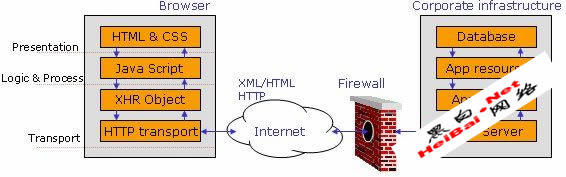
Figure 1. Web 2.0 architecture layout.
As shown in Figure 1, the browser processes on the left can be divided into the following layers:
* Presentation layer - HTML/CSS provides the overall appearance to the application in the browser window.
* Logic & Process - JavaScript running in the browser empowers applications to execute business and communication logic. AJAX-driven components reside in this layer.
* Transport - XMLHttpRequest (XHR) [ref 2]. This object empowers asynchronous communication capabilities and XML exchange mechanism between client and server over HTTP(S).
The server-side components on the right of Figure 1 that typically reside in the corporate infrastructure behind a firewall may include deployed web services along with traditional web application resources. An Ajax resource running on the browser can directly talk to XML-based web services and exchange information without refreshing the page. This entire communication is hidden from the end-user, in other words the end-user would not “feel” any redirects. The use of a “Refresh” and “Redirects” were an integral part of the first generation of web application logic. In the web 2.0 framework they are reduced substantially by implementing Ajax.
Web 2.0 assessment challenges
In this asynchronous framework, the application does not have many “Refreshes” and “Redirects”. As a result, many interesting server-side resources that can be exploited by an attacker are hidden. The following are three important challenges for security people trying to understand web 2.0 applications:
1. Discovering hidden calls - It is imperative that one identify XHR-driven calls generated by the loaded page in the browser. It uses JavaScript over HTTP(S) to make these calls to the backend servers.
2. Crawling challenges - Traditional crawler applications fail on two key fronts: one, to replicate browser behavior and two, to identify key server-side resources in the process. If a resource is accessed by an XHR object via JavaScript, then it is more than likely that the crawling application may not pick it up at all.
3. Logic discovery - Web applications today are loaded with JavaScript and it is difficult to isolate the logic for a particular event. Each HTML page may load three or four JavaScript resources from the server. Each of these files may have many functions, but the event may be using only a very small part of all these files for its execution logic.
We need to investigate and identify the methodology and tools to overcome these hurdles during a web application assessment. For the purpose of this article, we will use Firefox as our browser and try to leverage some of its plugins to combat the above challenges.
Discovering hidden calls
Web 2.0 applications may load a single page from the server but may make several XHR object calls when constructing the final page. These calls may pull content or JavaScript from the server asynchronously. In such a scenario, the challenge is to determine all XHR calls and resources pulled from the server. This is information that could help in identifying all possible resources and associated vulnerabilities. Let's start with a simple example.
Suppose we can get today’s business news by visiting a simple news portal located at:
http://example.com/news.aspx
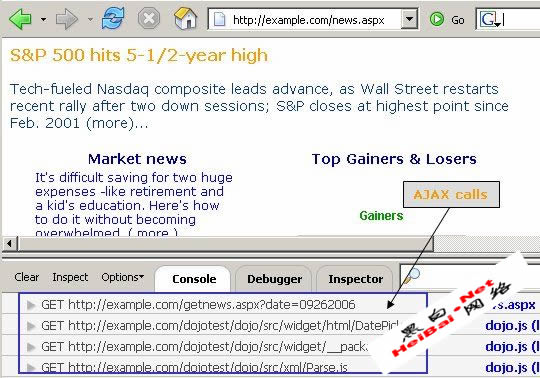
The page in the browser would resemble the screenshot illustrated below in Figure 2.

Being a web 2.0 application, Ajax calls are made to the server using an XHR object. We can determine these calls by using a tool known as Firebug [ref 3]. Firebug is a plug-in to the Firefox browser and has the ability to identify XHR object calls.
Prior to browsing a page with the plugin, ensure the option to intercept XHR calls is selected, as shown in Figure 3.
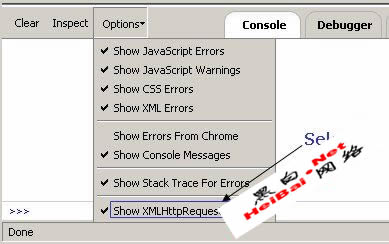
With the Firebug option to intercept XMLHttpRequest calls enabled, we browse the same page to discover all XHR object calls made by this particular page to the server. This exchange is shown in Figure 4.
AJAX and interactive web services form the backbone of “web 2.0” applications. This technological transformation brings about new challenges for security professionals.
This article looks at some of the methods, tools and tricks to dissect web 2.0 applications (including Ajax) and discover security holes using Firefox and its plugins. The key learning objectives of this article are to understand the:
* web 2.0 application architecture and its security concerns.
* hacking challenges such as discovering hidden calls, crawling issues, and Ajax side logic discovery.
* discovery of XHR calls with the Firebug tool.
* simulation of browser event automation with the Chickenfoot plugin.
* debugging of applications from a security standpoint, using the Firebug debugger.
* methodical approach to vulnerability detection.
Web 2.0 application overview
The newly coined term “web 2.0” refers to the next generation of web applications that have logically evolved with the adoption of new technological vectors. XML-driven web services that are running on SOAP, XML-RPC and REST are empowering server-side components. New applications offer powerful end-user interfaces by utilizing Ajax and rich internet application (Flash) components.
This technological shift has an impact on the overall architecture of web applications and the communication mechanism between client and server. At the same time, this shift has opened up new security concerns [ref 1] and challenges.
New worms such as Yamanner, Samy and Spaceflash are exploiting “client-side” AJAX frameworks, providing new avenues of attack and compromising confidential information.
Figure 1. Web 2.0 architecture layout.
As shown in Figure 1, the browser processes on the left can be divided into the following layers:
* Presentation layer - HTML/CSS provides the overall appearance to the application in the browser window.
* Logic & Process - JavaScript running in the browser empowers applications to execute business and communication logic. AJAX-driven components reside in this layer.
* Transport - XMLHttpRequest (XHR) [ref 2]. This object empowers asynchronous communication capabilities and XML exchange mechanism between client and server over HTTP(S).
The server-side components on the right of Figure 1 that typically reside in the corporate infrastructure behind a firewall may include deployed web services along with traditional web application resources. An Ajax resource running on the browser can directly talk to XML-based web services and exchange information without refreshing the page. This entire communication is hidden from the end-user, in other words the end-user would not “feel” any redirects. The use of a “Refresh” and “Redirects” were an integral part of the first generation of web application logic. In the web 2.0 framework they are reduced substantially by implementing Ajax.
Web 2.0 assessment challenges
In this asynchronous framework, the application does not have many “Refreshes” and “Redirects”. As a result, many interesting server-side resources that can be exploited by an attacker are hidden. The following are three important challenges for security people trying to understand web 2.0 applications:
1. Discovering hidden calls - It is imperative that one identify XHR-driven calls generated by the loaded page in the browser. It uses JavaScript over HTTP(S) to make these calls to the backend servers.
2. Crawling challenges - Traditional crawler applications fail on two key fronts: one, to replicate browser behavior and two, to identify key server-side resources in the process. If a resource is accessed by an XHR object via JavaScript, then it is more than likely that the crawling application may not pick it up at all.
3. Logic discovery - Web applications today are loaded with JavaScript and it is difficult to isolate the logic for a particular event. Each HTML page may load three or four JavaScript resources from the server. Each of these files may have many functions, but the event may be using only a very small part of all these files for its execution logic.
We need to investigate and identify the methodology and tools to overcome these hurdles during a web application assessment. For the purpose of this article, we will use Firefox as our browser and try to leverage some of its plugins to combat the above challenges.
Discovering hidden calls
Web 2.0 applications may load a single page from the server but may make several XHR object calls when constructing the final page. These calls may pull content or JavaScript from the server asynchronously. In such a scenario, the challenge is to determine all XHR calls and resources pulled from the server. This is information that could help in identifying all possible resources and associated vulnerabilities. Let's start with a simple example.
Suppose we can get today’s business news by visiting a simple news portal located at:
http://example.com/news.aspx
The page in the browser would resemble the screenshot illustrated below in Figure 2.
Being a web 2.0 application, Ajax calls are made to the server using an XHR object. We can determine these calls by using a tool known as Firebug [ref 3]. Firebug is a plug-in to the Firefox browser and has the ability to identify XHR object calls.
Prior to browsing a page with the plugin, ensure the option to intercept XHR calls is selected, as shown in Figure 3.
With the Firebug option to intercept XMLHttpRequest calls enabled, we browse the same page to discover all XHR object calls made by this particular page to the server. This exchange is shown in Figure 4.
上一页12 3 下一页 阅读全文
您可能感兴趣的文章


阅读排行
- 1电脑无声音提示Windows音频错误0xc00d11d1(0xc00d4e86)的解决办法..
- 2电脑开机进不去系统提示0xc0000428怎么办? 0xc0000428错误代码解决办法..
- 3电脑运行快捷指令怎么打开? 打开运行命令框的方法汇总..
- 4电脑卸载流氓软件的5个隐藏技巧 实测有效
- 5C盘文件怎么转移到d盘? 将电脑C盘文档转移到D盘的多种技巧汇总..
- 6发票打印提示缺少字体怎么解决? 电脑显示缺少发票打印字库的处理方法..
- 7无线网卡插电脑上没没有网络怎么办? 电脑不识别无线网卡的解决办法..
- 8电脑没有网连不上wifi怎么办? 电脑网络连接不上的多种解决办法..
- 9录音功能在哪里? 电脑手机等设备打开录音功能的技巧..
- 10消灭机械硬盘!固态硬盘的选购和使用
推荐教程
- 1电脑无声音提示Windows音频错误0xc00d11d1(0xc00d4e86)的解决办法..
- 2电脑开机进不去系统提示0xc0000428怎么办? 0xc0000428错误代码解决办法..
- 3电脑运行快捷指令怎么打开? 打开运行命令框的方法汇总..
- 4电脑卸载流氓软件的5个隐藏技巧 实测有效
- 5C盘文件怎么转移到d盘? 将电脑C盘文档转移到D盘的多种技巧汇总..
- 6发票打印提示缺少字体怎么解决? 电脑显示缺少发票打印字库的处理方法..
- 7无线网卡插电脑上没没有网络怎么办? 电脑不识别无线网卡的解决办法..
- 8电脑没有网连不上wifi怎么办? 电脑网络连接不上的多种解决办法..
- 9录音功能在哪里? 电脑手机等设备打开录音功能的技巧..
- 10消灭机械硬盘!固态硬盘的选购和使用
 粤公网安备 13010202004186